
Built by a former CTE teacher. Priced for CTE budgets.
The cert prep platform your students need, plus the exam-mapped help desk simulator most curriculums skip, ready for your whole class or district. Classroom dashboard included. No per-student credit cards. Request a free 30-day pilot with no card and no auto-renewal.
FERPA-aware describes how we minimize and handle data. It is not a legal clearance. There is no signable Data Processing Addendum, no counsel-reviewed FERPA position, no completed VPAT, and no independent security assessment today. If your district needs those before adoption, we do not have them yet.

Taught CompTIA A+ and Network+ at the HS-college dual-credit level. Now runs Revtek. I taught the certs. I hire for the certs. RTJ closes the gap between.
I taught from the textbook. My students passed the exam. Then they sat down at a real ticket queue on day one and didn't know what to do. That's the gap I'm closing.
Running more than one classroom? Districts and multi-section programs get licensed seats, per-teacher sections, and one admin view of every teacher and their students, with the exam-mapped simulator running for every seat.
RTJ for districtsFour audiences. One platform. One classroom code at a time.
Educators teaching CompTIA A+ and intro IT in any of these settings. If your program touches a help desk eventually, this fits.
CTE / high school IT
You teach the cert. Your kids pass. Then they freeze on day one of an internship because they've never touched a ticket.
Built for 11th and 12th gradersCommunity college IT
Bridge the gap between textbook A+ and the help desk job your grads are actually applying to next semester.
Classroom pilot setup for college cohortsWorkforce development
Stand up cohort-based IT training in weeks, not semesters. Track each learner's latest full-exam evidence without a homework spreadsheet.
City, county, and state programsIT apprenticeships
Pair classroom hours with simulated ticket triage so apprentices show up to their first sit-by-side ready to take a call.
Pairs with on-the-job hoursCert prep, plus the part that gets skipped.
Most CTE tools either drill flashcards into your students' eyes, or simulate a help desk without teaching the underlying skill. Revy does both, with a dashboard you actually use.
Curriculum that bridges cert and job
Same A+ objectives your students need to pass. Same triage decisions and customer comms they will face in their first internship. One platform, both motions.
- Aligned to CompTIA A+, Network+, and Security+
- Adventure scenarios mapped to objectives
- Any track after these three lives on the public roadmap
Classroom dashboard for tracking
Latest full-exam evidence, selected weekly Quiz and Simulator activity, Sim attempts, and last activity. These are pilot signals, not complete all-surface analytics or a grade-book export.
- Latest full-exam evidence
- Engagement and time on task
- Weak-spot reports per module
Help Desk Simulator for hands-on
A simulated ticket queue with branching triage, customer comms, and hand-offs: the muscle memory students need on day one, mapped to the exam objectives you already teach. The help desk simulator is the part most cert prep skips, and it runs for your whole class or district.
- Simulated ticket queue, branching outcomes
- Customer-comms rubric for soft skills
- Per-student sim history for grading
Direct student-teacher messaging
Built-in async messaging between you and each student. Private, one-to-one, no email needed. They reach you through their dashboard, you reply from the teacher inbox. Useful when a student is stuck on a sim ticket and needs your eyes on it.
- Private one-to-one threads, no group chat
- Unread badge on both sides
- Scoped to your classroom, never email
The dashboard you will have open during 1st period.
Latest full-exam scores, time on task, sim performance, and a list of who has not logged in this week. No homework-spreadsheet workflow. No vague engagement scores. You see who is grinding and who is coasting.
CTE IT · Period 3 · A+ Cohort
CTE-A11-2026 · 24 of 30 seats used · Spring semester| Student | Latest full exam | Time | Sim | Last active | Status |
|---|---|---|---|---|---|
| MAMaria AlvarezGrade 11 · Period 3 | 86% | 9h 42m this week | 12 / 12 resolved / opened | Today, 2:14 PM | Benchmark met |
| JTJaylen ThompsonGrade 11 · Period 3 | 78% | 8h 11m this week | 11 / 12 resolved / opened | Today, 1:02 PM | Benchmark met |
| PSPriya ShahGrade 12 · Period 3 | 71% | 7h 38m this week | 10 / 12 resolved / opened | Today, 11:50 AM | Watch |
| MRMarcus ReedGrade 11 · Period 3 | 58% | 5h 04m this week | 07 / 12 resolved / opened | Yesterday | Watch |
| SPSofia ParkGrade 12 · Period 3 | 52% | 4h 31m this week | 06 / 12 resolved / opened | 2 days ago | Watch |
| DODaniel OwusuGrade 11 · Period 3 | 33% | 1h 18m this week | 02 / 12 resolved / opened | 5 days ago | At risk |
Assign the work, then watch it come back.
Push a quiz, a sim ticket, PBQ practice, or a full practice exam to the whole class or to specific students, set a due date, and each student gets it in their own classwork queue. They open it, do it, and submit it back to you.
Seven task types can be assigned: Adventure lesson, Study Guide, Flashcards, Quiz, Practice Exam, PBQ, and Simulator. Assign to the whole class or pick specific students, set a due date, and track submitted, late, and completed as the work comes in.
How do students join, and how do seats work?
You create a classroom and share one code. Up to your seat limit of students join with it. No email roster to wrangle, no per-student credit cards. Each student keeps the learning access attached to their own profile.
CTE IT · Period 3 · A+ Cohort
CTE-A11-2026CopyBase Teacher includes 30 seats. Add seat packs of 10 or 25 when a cohort outgrows it, without changing plans.
Four ways to hand out the code
Can students reach you when they get stuck?
Yes. Every classroom has a built-in message thread between you and each student. They flag where they are stuck, you reply from one inbox that shows every thread across your classrooms. It is async and one-to-one, so there is no group chat and no student-to-student messages, and unread shows as a badge, not another email.
I'm stuck on subnetting question 4. I keep getting /26 but the answer key says /27. Where did I go wrong?
Good catch, that one can trip anyone. Count the hosts you actually need, then round up to the next power of two. 30 hosts needs 32 addresses, so /27. Walk me through your math and I'll spot it.
Oh, I was counting the network and broadcast addresses as usable. That was it. Thanks.
One inbox for every classroom you run. A student flags a blocker or asks about a sim ticket, you answer where the work is. Useful for the phishing-style scenarios where the conversation is the lesson.
CTE-budget pricing. Sponsored by you, not by your students' parents.
Start with one free classroom pilot. If you need another period or a larger pilot, we review it by hand. No sales call required.
Free 30-day pilot
Take it for a spin with one class. Students join with a classroom code and keep the learning access attached to their own profile. We do not email you twice a week trying to upgrade you.
- Up to 30 active students under one code
- Student learning access stays profile-based
- Classroom dashboard and progress evidence
- 30 days, no auto-renew, no card
After 30 days, the pilot ends. To continue, talk with us about $149/mo or $1490/yr per teacher. Add seat packs as you grow: +10 seats $25/mo or $250/yr, +25 seats $50/mo or $500/yr (best value).
Request your free pilotAdditional class request
Current access is teacher-based. Start with one class of up to 30 active students. If you need another period or a larger pilot, we will review the setup with you.
- One Teacher account per pilot classroom
- One class of up to 30 active students to start
- Additional periods reviewed by hand
- Curriculum alignment doc included
Mapped to the syllabi your principal already approved.
Drop in next semester without rewriting your scope and sequence. Ask us for the objective mapping and you will see, lesson by lesson, which objectives each lesson covers. It is a working document we send by email, not a published download.
Mapped to the exam, not a substitute for it or for college credit.
- Revy's Tech Journey is exam prep, not an accredited course. Completing the platform does not grant transcript credit at any college or university on its own.
- We do not issue CompTIA certifications. Students still have to schedule and take the real exam through Pearson VUE. The exam voucher is separate from your RTJ subscription.
- Our internal Mastery badges (per-Core, Trinity Mastered, etc.) are platform achievements. They are not industry certifications and should not be listed on a resume as such.
- The teacher dashboard reports each learner's latest full Practice Exam score. It does not expose the device-computed Mastery Index, predict a CompTIA result, or instruct anyone to schedule.
- We are a third-party prep tool that aligns to CompTIA's published exam objectives. Mapping to those objectives is what gives institutional programs confidence.
Questions about how RTJ fits a specific program of study? Email us before you adopt and we will tell you straight up where it slots in and where it does not.
Ask for the objective mapping.
There is no published alignment PDF today. What exists is the lesson-to-objective mapping behind the A+, Network+, and Security+ tracks, and we pull the part covering your track and send it by email. It is a working document, it gets reviewed by hand before it goes out, and there is no delivery date attached to it.
Email us for the mappingSee what your students will work through.
Real pages from the A+ pilot lesson, Ports and Protocols. The A+ track has 65 lesson slots built on this same kit shape: a branded slide deck, a paced lesson plan, two assignments, and a sub plan. Download files and answer-key coverage are still being provisioned lesson by lesson, so check what each lesson lists as available rather than assuming all 65 are complete.
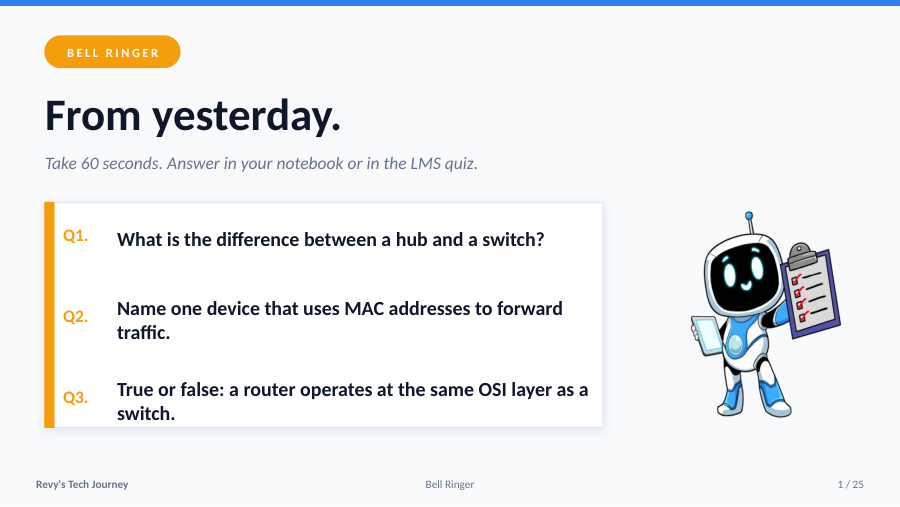
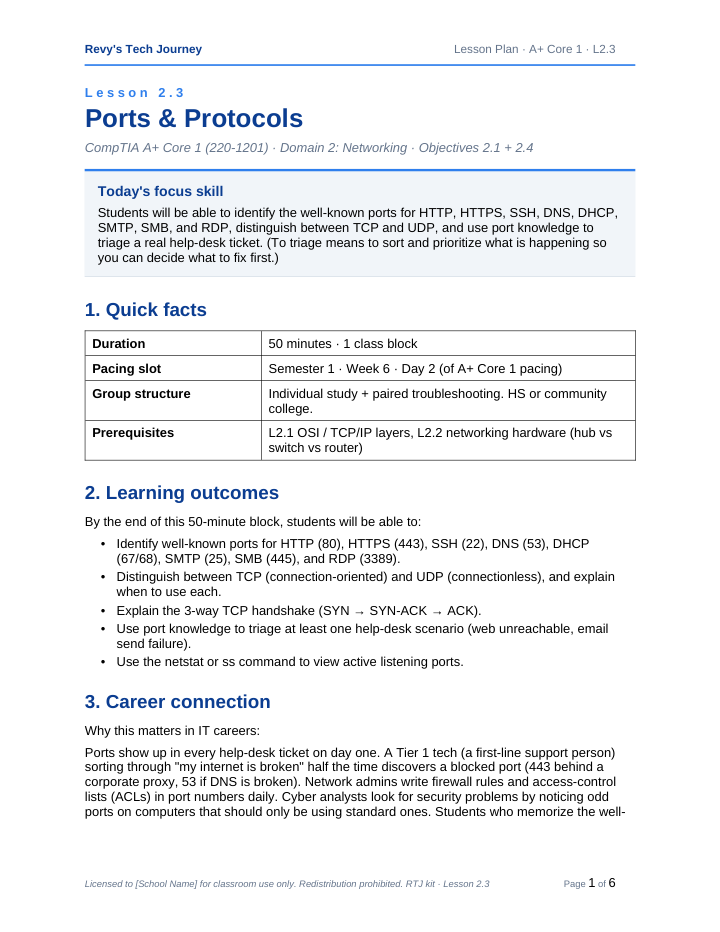
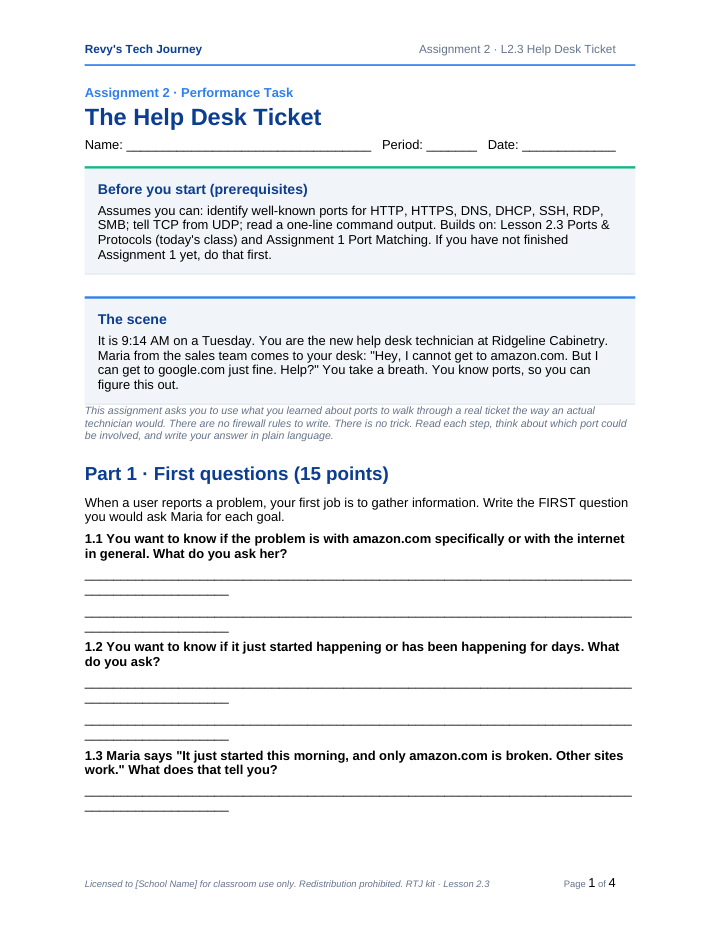
The curriculum browser covers 118 lesson slots across A+, Network+, and Security+. Download files and answer-key coverage are still being provisioned and verified. The sample files on this page are the currently verified public artifacts.
The boring stuff your admin will ask about first.
Honest version: we are early, so there are no adoption numbers in this section. No school count, no student count, no cohort outcome data, because none of that exists yet. We are not going to borrow a "trusted by 10,000+ schools" line to fill the gap.
Built by someone who has done your job
Nick taught CompTIA A+ and Network+ at the dual-credit level before founding Revtek. He has run the exact classroom you are running and built this for the gap he kept hitting.
Three years looking for a tool that taught both the cert and the job. Found none. So I built it.
FERPA-aware data handling
We do not sell student data or use it for advertising. A signable Data Processing Addendum is not available today and requires legal review before an institutional agreement.
No ads. Not to students, not ever.
No banner ads. No sponsored content. No tracking pixels resold to a partner network. The product is paid for by the classroom license, full stop.
Pilot programs open
Honest: we do not have the 1,200 schools badge yet. We have a few CTE programs piloting now and we would rather you join us before we rewrite this section with real numbers.
Filter-friendly and accessibility-aware
District filter compatibility must be validated in each pilot environment. A written accessibility status is available; no completed VPAT or signable Data Processing Addendum is available today.
Illinois LLC with procurement review in progress
Revtek IT Solutions LLC is based in Oak Forest, Illinois. We accept POs, district checks, and workforce-grant funding. Our pilot-to-PO timeline target is one week. The first cohort will confirm or revise this.
The questions your admin will ask before you do.
How does student data actually get handled? FERPA?
Current classroom records include student account and selected progress data. We do not sell student data or use it for advertising. RTJ uses FERPA-aware data-minimization practices, but no signable Data Processing Addendum or counsel-reviewed FERPA position is available today. A buyer should review the current written data inventory and open controls before any institutional agreement.
Can I use this with state-mandated curriculum?
Probably, and you should check it yourself rather than take our word for it. There is no published alignment document. The lesson-to-objective mapping for A+, Network+, and Security+ is a working document we send by email on request. Lesson-kit metadata carries an Illinois CTE pathway citation and Texas TEKS section citations, and no state agency has reviewed those citations, so your department chair should map the material to your own pathway instead of treating ours as approved.
Do you support GoGuardian, Securly, or Lightspeed?
We have not certified against any of the three. RTJ runs in a normal browser with no plugin or client to install, so a standard allowlist entry for revystechjourney.com can be all a district needs. Filters get customized locally, so we test in your environment during pilot setup, and the pilot does not start until your students can log in from school Wi-Fi.
What if I want to add Net+ or Sec+ for my advanced students?
Network+ and Security+ are both live today. Network+ has a curriculum kit covering 25 lesson slots and Security+ covers 28, and per-lesson download and answer-key coverage is still being provisioned, so use the availability shown on each lesson instead of assuming a complete set. Your Teacher license covers any tracks we add during your annual term at no extra charge.
Do students need credit cards or separate billing?
Students join with the classroom code you give them and sign in to their own account. No credit card is required to join a class, and classroom membership does not create a student billing path. Learning access stays tied to each student's own account tier.
What does the teacher dashboard show me, exactly?
Per-student latest full Practice Exam evidence, selected Quiz and Simulator time this week, Sim attempts, last activity, weak Adventure evidence, and classroom messages. The score is one observed practice result, not the learner's Mastery Index or a pass prediction. Roster and progress CSV export is live and audited. A full grade-book style export and complete enrollment-window, track, and all-surface reporting are still planned.
Can I message my students directly through the platform?
Yes. Every classroom comes with built-in async student-teacher messaging. One-to-one threads, no public chat, no email. Students reach you through their dashboard, you reply from the teacher inbox. Especially useful for sim tickets where a student is stuck and needs you to walk them through the next step, or for phishing-style scenarios where the conversation IS the lesson.
Can I get a purchase order accepted? District procurement is slow.
Email support@revystechjourney.com before relying on a purchase order, district check, grant, tax form, insurance document, or procurement timeline. We will identify which current vendor artifacts are available and which still require preparation or review.
How long is the free pilot, and what is the catch?
30 days of Teacher learning access and the classroom dashboard, with one class of up to 30 active students. Student learning access stays tied to each student's own account tier. There is no credit card and no auto-renew. Before the pilot ends, we ask what worked and whether you want to continue. If not, we close the pilot and return the teacher account to Free. There is no surprise charge.
What happens if a student's name comes up in a sim scenario?
The simulator uses generated names for tickets and customer comms. We do not insert student names into the content. The only place a student's name appears is in their own dashboard and your teacher view.
Will Revy survive me changing classrooms or schools?
Yes. Classroom licenses are tied to you (the teacher) by default. If you change schools, you keep your dashboard and student progress (with student consent transfer). If you change district policies, we will work through it.
Run one class through it. Decide from there.
We will not book a discovery call. We will not send a sales sequence. You get a classroom code, you run it for 30 days, and you tell us what you think.